Search for people
Filter the lead database by job title, company, location and more — the results update as you go.
Lead search finds people in our lead database. Set filters on the left, and the people who match show on the right, 25 to a page.
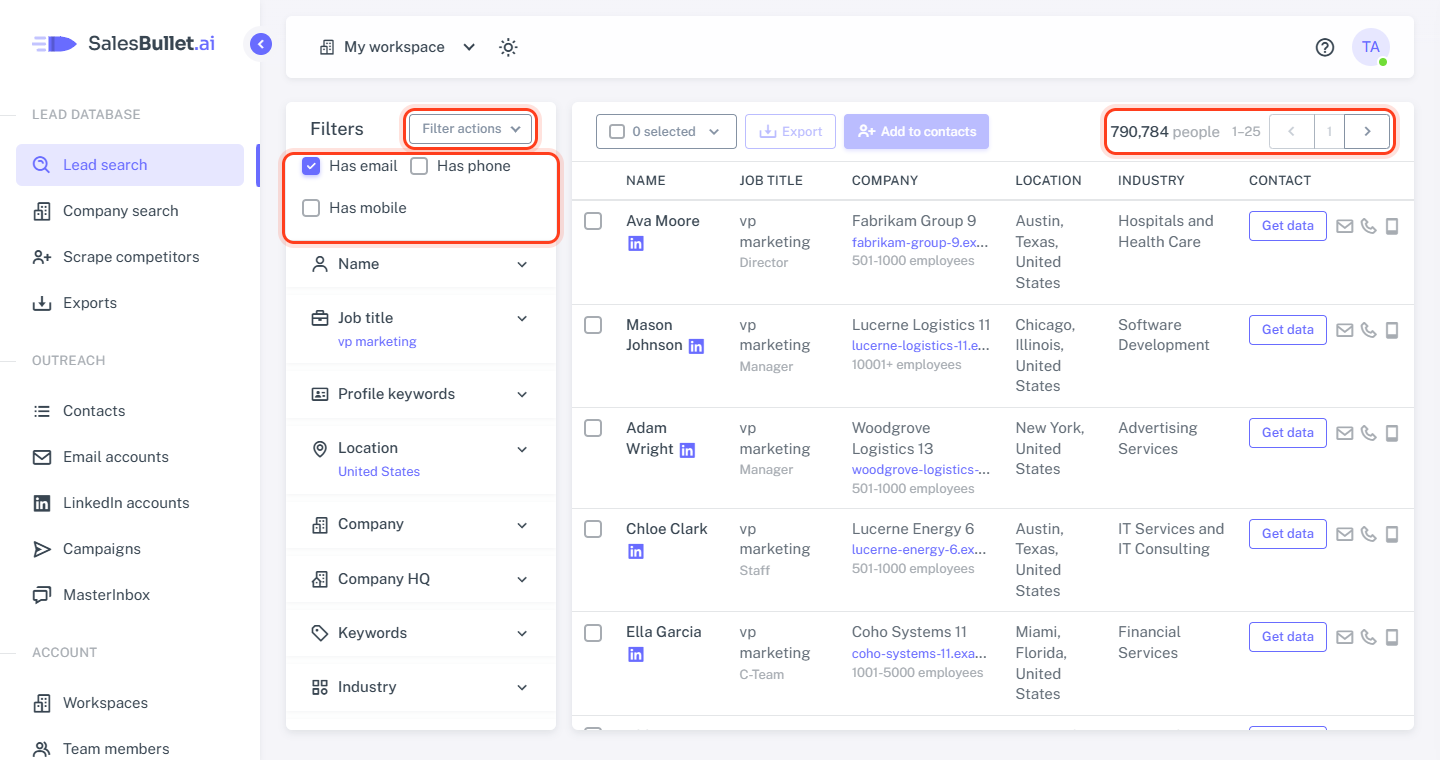
The filters
Click a section of Filters to open it. A closed section shows a one-line summary of what's set in it.
- Name — the person's full name.
- Job title — words in the title (Job title contains), an AI job title that describes the role, Persona, Changed jobs recently, Management level and Department.
- Profile keywords — words in their LinkedIn headline, "about" or current job description.
- Location — where the person is: country, state or city.
- Company — company names and domains, Exclude domains, Company type, the AI company description and Companies similar to.
- Company HQ — where the company's head office is.
- Keywords — words in the company's description or specialties.
- Industry, Size & growth, Funding, Hiring now, Website & ads and Technology — more about the company.
- Skills — skills on their profile.
Inside one filter, any value counts: Director or VP. Different filters must all match: Director and Marketing finds directors in marketing.
Has email, Has phone, Has mobile
These sit at the top of the panel. Has email is on when you open the page, so you only see people we have an email for. Tick Has phone or Has mobile for people with those numbers. They narrow a search but don't start one — set at least one other filter too.
The results
The results update a moment after you change a filter. Text in an AI box searches when you press Enter or click outside it. Searches with AI, keywords or skills take 5–15 seconds; a bar above the table shows the progress.
Each row shows the person's Name (with a link to their LinkedIn profile), Job title, Company, Location, Industry and Contact — where you get their email and phone numbers.
Above the table: how many people match, which ones you're looking at (1–25) and the buttons for the previous and next page — they're under the table too. The table pages through the first 2,500 people; to take more — up to 1,000,000 at once — select them by number and add them to your contacts, with no limit.
Filter actions
Filter actions, at the top of the panel:
- Save filters — keep this search for your team under a name.
- Load filters — open a saved search, or delete one.
- Clear all filters — start again (Has email stays on).
More in Save a search. To start from a list of companies instead, see Search for companies.