Send leads to Clay, Make, n8n or Zapier
The Webhook step sends each lead to your own tool and puts what it sends back into your messages.
The Webhook step connects a campaign to a tool you already use. Right before the step after it, each lead is sent to your tool — and whatever the tool sends back becomes a variable for your messages.
For example, Clay finds which CRM a lead's company uses and sends back crm: HubSpot. Your next email says
"…since you're on {{crm}}…", and Dana's reads "…since you're on HubSpot…".
Add the step
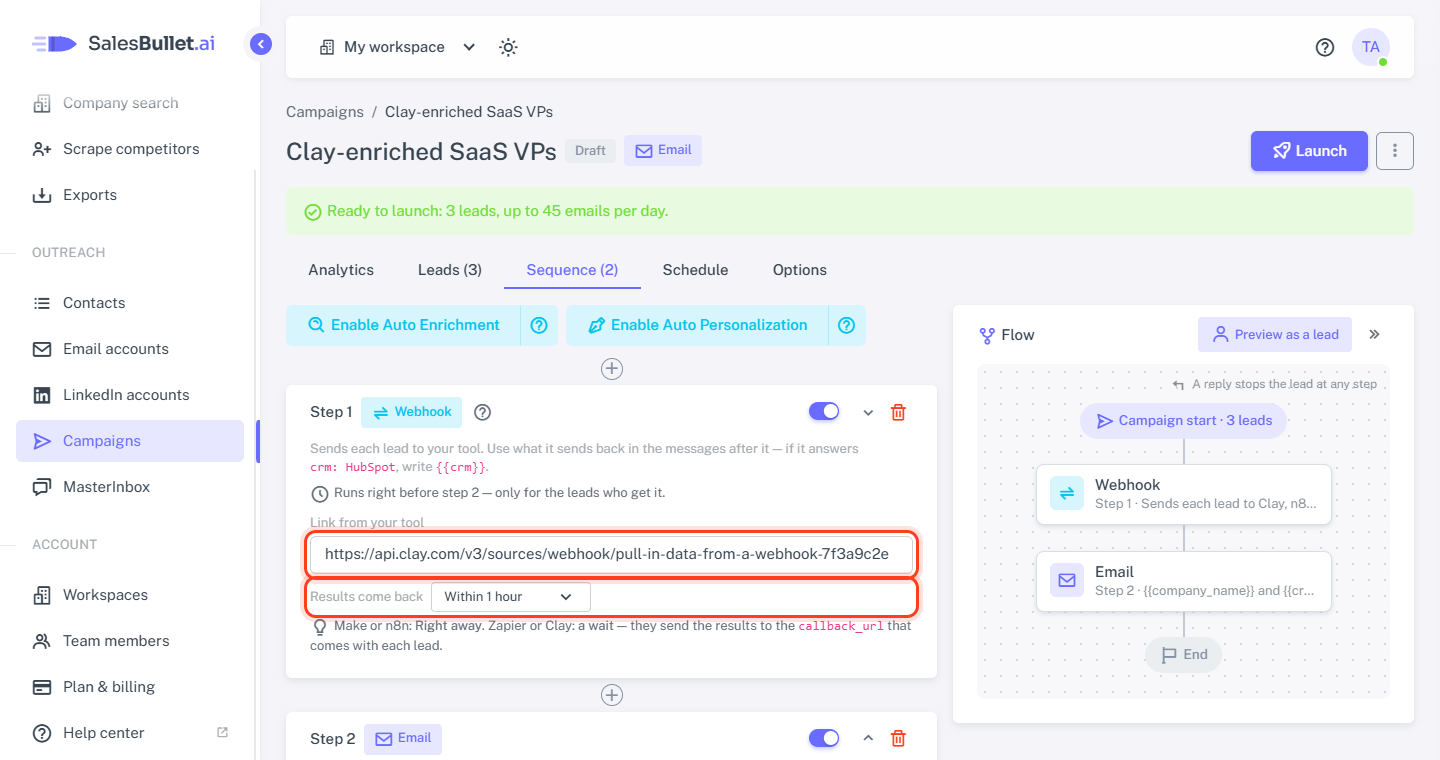
On your campaign's Sequence tab, click Add step — or the + between two steps — and choose Webhook. Put it before the message that uses the results. Then fill in two things:
- Link from your tool — the webhook link your tool gives you.
- Results come back — Right away, or Within 15 minutes / 1 hour / 4 hours / 1 day.
Tip
Make or n8n: Right away. Zapier or Clay: a wait — they send the results to the callback_url that comes with
each lead.
What your tool gets
Each lead arrives as JSON: their details as your messages use them, the campaign and the step — and callback_url
when the results come back later. Leads from our lead database come without their email and phone number — your
tool finds what it needs from their LinkedIn profile, name and company. Contacts you uploaded yourself come with
theirs.
{
  "lead": {
    "first_name": "Dana",
    "last_name": "Whitfield",
    "company_name": "Northwind",
    "job_title": "VP Marketing",
    "linkedin_url": "https://www.linkedin.com/in/dana-whitfield"
  },
  "campaign": { "id": 12, "name": "Q4 SaaS VPs" },
  "step": 1,
  "callback_url": "https://salesbullet.ai/webhooks/steps/3f9c1a…"
}
Sending the results back
Right away — Make, n8n
End the scenario or workflow with Webhook response (Make) or Respond to Webhook (n8n), answering with the
fields as JSON — for example {"crm": "HubSpot"}. It has 30 seconds to answer.
Later — Clay, Zapier
Send the fields as JSON to the lead's callback_url: in Clay with an HTTP API column at the end of the table, in
Zapier with a Webhooks by Zapier → POST step. The lead waits for them — up to the time you chose.
Set it up in Clay
- In Clay, create a table and pick Monitor webhook — Clay shows the table's webhook link.
- Paste that link into the step and choose Results come back: Within 1 hour.
- Add the columns that find what you need, such as the company's CRM.
- Add an HTTP API column: method POST, the URL from the
callback_urlcolumn, and a body such as{"crm": "…your CRM column…"}. - Click Preview as a lead above the campaign's flow, then Try on this lead — one lead goes to Clay now, and its results show on the Webhook box when they arrive.
Use the results in your messages
Write the field's name in double braces: {{crm}}. Give it a fallback for the leads your tool finds nothing about —
{{crm|your CRM}}. The results are kept with the contact, so later steps and other campaigns can use them too.
When your tool doesn't answer
- An error, or no answer within 30 seconds: we try 3 times, 10 minutes apart.
- Results that don't come back within the time you chose: the lead goes on without them.
Either way your messages use the fallbacks, and Preview as a lead shows what happened for each lead.
Note
Leads only go to public addresses on the internet, and each lead's callback_url is a secret link of its own — only
your tool, which got the lead, can send results for it.